
外观
CardContent 卡片
CardContent 提供与 CapDrive 原生卡片一致的标题区域、可选右上角内容和正文布局。它不提供整张卡片的不透明背景。
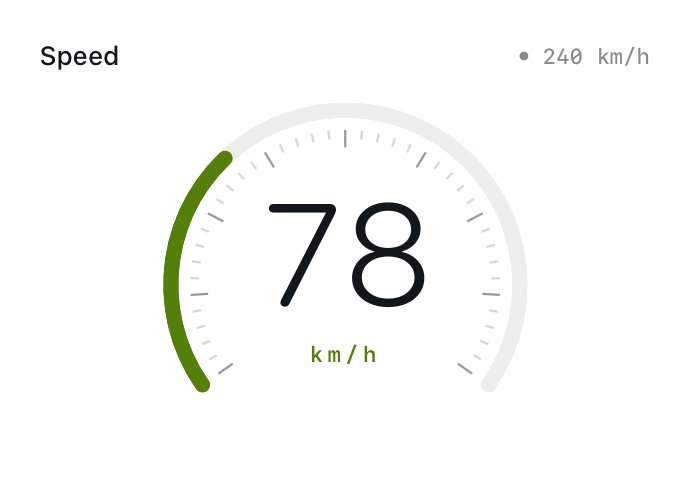
常用属性
| 属性 | 类型 / 默认 | 用途 |
|---|---|---|
title | 字符串或 JSX 组件 | 左上角标题 |
trailing | 字符串或 JSX 组件 | 右上角辅助内容 |
fulled | 布尔值,默认 false | 正文是否延伸到整张卡片的边缘和标题后方 |
headerBlurColor | 颜色或 null | 开启并着色标题后方的渐退材质 |
renderer | 函数,可选 | 接收正文布局指标并返回正文 |
属性名是 fulled。普通使用保持默认,地图铺满背景时再使用 fulled={true}。
默认布局
jsx
function main() {
  return <CardContent title="速度" trailing={$data.current.speedUnit}>
    <Text fontSize={64} color={$env.foreground}>
      {$data.current.speed === null ? '—' : Math.round($data.current.speed)}
    </Text>
  </CardContent>;
}字符串标题使用原生卡片的标题字号与颜色;trailing 字符串使用更小的等宽风格。自定义 View 槽位保留你提供的字号、颜色与布局。
默认正文有 18 点边距,并为标题高度和标题下方 8 点间距预留位置。
自定义标题与右上角
jsx
<CardContent
  title={<HStack spacing={4}>
    <Symbol name="location.fill" width={12} height={12} color={$env.accent}/>
    <Text fontSize={12} color={$env.foreground}>位置</Text>
  </HStack>}
  trailing="GPS">
  <Text color={$env.foreground}>正文</Text>
</CardContent>title 和 trailing 可以是字符串或一个 JSX View;数字可先转成字符串。没有标题时,不会绘制空标题材质。
精确绘图:renderer 与 metrics
renderer={metrics => ...} 用来替代普通正文子节点。不要同时依赖两套正文来源。
| 指标 | 说明 |
|---|---|
headerHeight | 完整标题区域高度,含顶部推荐边距;普通字符串标题通常约 33 点 |
supportedGapLeft | 建议的正文左边距,通常 18 点 |
supportedGapRight | 建议的正文右边距,通常 18 点 |
supportedGapTop | 标题下到正文的建议间距,通常 8 点;无标题时为正文顶部边距 |
supportedGapBottom | 建议的正文底部边距,通常 18 点 |
jsx
function main() {
  return <CardContent title="布局示例" renderer={m => {
    const w = Math.max(0, $env.width - m.supportedGapLeft - m.supportedGapRight);
    const h = Math.max(0, $env.height - m.headerHeight - m.supportedGapTop - m.supportedGapBottom);
    return <Group width={w} height={h}>
      <Text x={0} y={0} width={w} height={h} fontSize={48}
        minimumScaleFactor={0.5} color={$env.foreground}>78</Text>
    </Group>;
  }}/>;
}默认 fulled={false} 时,正文起点已经位于标题之后。上例只用指标计算可用尺寸,不再把 headerHeight 加到正文 Y 坐标上。
全铺内容与渐退标题材质
jsx
function main() {
  return <CardContent title="当前位置" fulled={true} headerBlurColor="clear">
    <Map width="fill" height="fill"/>
  </CardContent>;
}- 不传
headerBlurColor,或传null:不开启标题后的材质与染色。 - 传
"clear":开启渐退材质,但不叠加颜色染色。 - 传普通颜色或
HDR(...):开启材质并使用该色进行染色。
材质位于标题后方,标题文字保持清晰。fulled={true} 时,metrics 仍描述建议的非全铺边距,方便你自行决定是否采用。